


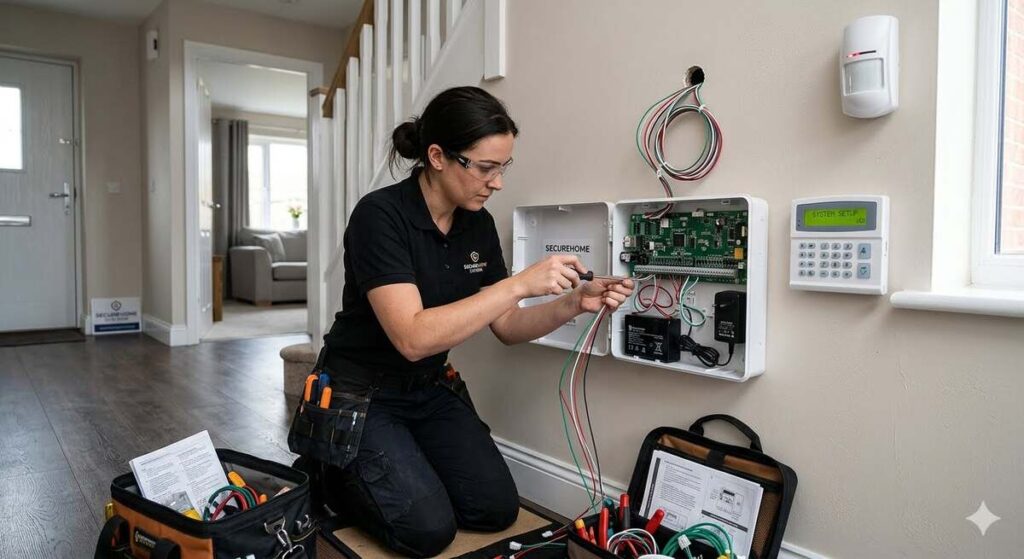
A well-planned intruder alarm does more than make noise when a door opens. It creates layers of protection, gives you faster awareness, and helps turn your home from an easy target into a harder, less predictable one. The difference between a dependable system and a frustrating one usually comes down to the installation process: where sensors are placed, how zones are configured, how users are trained, and how the system is tested after everything is connected. The actual Interesting Info about Intruder Alarm Installation.
This guide walks you through the practical process of Intruder Alarm Installation from planning to testing. Whether you are installing a simple wireless alarm kit or preparing for a more advanced setup as part of broader home security systems, the goal is the same: build a system that is easy to use, difficult to bypass, and reliable when it matters.
Before you begin, remember one important rule: security equipment works best when it is installed thoughtfully, not hurriedly. A rushed alarm setup can lead to blind spots, false alarms, weak coverage, and household members who avoid using the system because it feels inconvenient. A careful installation gives you stronger protection and fewer headaches.
Start With a Clear Security Plan
Every effective security system installation begins before any sensor is mounted. The planning stage helps you understand what you are protecting, where an intruder is most likely to enter, and how the alarm should behave when triggered.
Walk through your property with a security-first mindset. Look at your home the way a potential intruder might. Pay attention to entry points that are hidden from the street, doors with poor lighting, windows near flat roofs, basement access points, attached garages, side gates, and rear entrances. These are often more important than the front door because they may offer more privacy.
As you inspect the property, make notes about:
- Main entry doors
- Back and side doors
- Ground-floor windows
- Accessible upper windows
- Sliding patio doors
- Basement doors and windows
- Garage entry points
- Hallways leading to bedrooms
- Rooms containing valuables
- Areas with poor visibility from neighbors or the street
- Places where pets commonly move
This walkthrough helps you decide how many sensors you need and where to place them. It also helps you avoid the common mistake of buying equipment first and trying to make it fit later.
Your plan should answer four practical questions:
- What should be protected first? Prioritize likely entry points before secondary spaces.
- What should happen when the alarm is triggered? Decide whether the system should activate a siren, send phone alerts, notify a monitoring center, or combine multiple responses.
- Who will use the system? Consider adults, children, guests, cleaners, carers, or tenants who may need access.
- How will daily life affect the setup? Think about pets, night routines, frequent deliveries, home offices, and family members who leave at different times.
A good alarm plan fits the home as it is actually used. The best system is not necessarily the one with the most devices. It is the one that covers the right places, works reliably, and is simple enough for people to use every day.
Choose the Right Type of Intruder Alarm System
Before installation, decide which alarm system style suits the property. Most modern home systems fall into a few broad categories, each with advantages.
Wired alarm systems
A wired alarm uses physical cables to connect sensors, control panels, sirens, and other devices. Wired systems are often used in new builds, renovations, larger properties, or situations where long-term durability is the main priority.
Wired alarms can be very dependable because they do not rely on sensor batteries or wireless signal strength in the same way as wireless devices. However, they usually require more installation work. Running cables through walls, ceilings, or floors can be difficult in a finished home and may require a professional installer.
Wireless alarm systems
A wireless system uses battery-powered sensors that communicate with a central hub or panel. These systems are popular for existing homes because they are usually faster to install and cause less disruption.
Wireless systems are useful when you want flexible placement, quicker setup, and easy expansion. The main installation considerations are wireless range, battery maintenance, and the avoidance of signal interference from thick walls, metal structures, or electronic equipment.
Hybrid alarm systems
A hybrid system combines wired and wireless components. This can be a strong choice if part of the home is already wired or if you want to protect a large property with a mix of fixed and flexible devices.
For example, you might use wired sensors on key external doors and wireless sensors in rooms where cabling would be difficult. Hybrid systems can offer a balanced approach, but they often require careful planning to ensure everything integrates properly.
Monitored and self-monitored systems
You will also need to decide how alerts are handled.
A self-monitored system sends notifications directly to you or selected contacts. This can be convenient and cost-effective, but it depends on someone noticing and responding quickly.
A monitored system connects to a professional monitoring service that can respond according to a predefined process. This can add reassurance, especially when you are away, sleeping, traveling, or unable to check your phone.
The best choice depends on your budget, risk level, lifestyle, and response expectations. If you are unsure, keep the installation flexible so the system can be upgraded later.
Know the Main Components Before You Install
Understanding the parts of an alarm system makes installation easier and helps you avoid poor placement decisions.
Most intruder alarm systems include some combination of the following components.
Control panel or hub
The control panel is the brain of the system. It receives signals from sensors, manages arming and disarming, controls sirens, and communicates alerts. In app-based systems, the hub may work quietly in the background while the phone app becomes the main user interface.
The control panel should be accessible enough for everyday use but not so obvious that an intruder can easily reach it before the alarm communicates an alert. If your system uses a separate keypad, the main panel may be placed in a more protected location.
Keypad
The keypad allows users to arm, disarm, and control the system. It is usually placed near the main entry door, but some homes benefit from a second keypad near a bedroom or garage entry.
A keypad should be easy for authorised users to reach during entry and exit, but positioned so it does not reveal too much from outside windows.
Door and window contacts
Contact sensors detect when a door or window is opened. They usually come in two parts: one mounted on the frame and one mounted on the moving door or window.
These sensors are simple but important. They are often your first line of detection because they protect the perimeter before someone is fully inside.
Motion detectors
Motion detectors monitor movement inside a space. They are commonly placed in hallways, living rooms, stair landings, or routes an intruder would likely take after entering.
Placement matters. A motion detector pointed at a heat source, a window, a moving curtain, or a pet’s pathway may cause false alarms. A motion detector placed too low, too high, or behind furniture may miss important movement.
Glass-break sensors
Glass-break sensors detect the sound or vibration associated with breaking glass. They can be useful for large windows, patio doors, and areas where an intruder might smash glass instead of opening a window or door.
These sensors should be installed within the manufacturer’s recommended range and in accordance with room conditions. Curtains, blinds, room size, and background noise can affect performance.
Sirens and sounders
An internal siren alerts people inside the property and can make the space uncomfortable for an intruder. An external sounder can alert neighbors and draw attention to the property.
The siren should be loud enough to be effective and placed where it is difficult to tamper with. Outdoor sirens should be weather-appropriate and securely mounted.
Panic buttons or personal alarm triggers
Panic buttons allow someone to manually trigger an alarm. These may be fixed buttons, key fobs, app controls, or wearable devices.
They are especially useful for vulnerable residents, home workers, reception areas in small businesses, or anyone who may need a fast alert option.
Cameras and smart integrations
Cameras are not always part of an intruder alarm, but many modern home security systems integrate alarms, cameras, lights, locks, and mobile alerts. Cameras can help verify the cause of an alarm and may support better decision-making during an incident.
If you add cameras, think carefully about privacy, field of view, lighting, storage, and notification settings. Cameras should support the alarm strategy rather than distract from it.
Gather Tools and Materials
The tools you need will depend on the system type, but most basic installations require a practical kit. Prepare everything before you start so you do not stop halfway through with sensors partly mounted.
For a typical wireless installation, you may need:
- Intruder alarm control panel or hub
- Door and window sensors
- Motion detectors
- Keypad or remote controls
- Siren or sounder
- Screws, wall plugs, or mounting brackets
- Adhesive pads if approved by the manufacturer
- Screwdriver
- Drill and suitable drill bits
- Tape measure
- Pencil
- Spirit level
- Ladder or step stool
- Cleaning cloth for surfaces
- Batteries if not pre-installed
- Smartphone or tablet for app setup
- Wi-Fi details if the system needs internet access
- User manuals and installation guides
For wired installations, you may also need cable, cable clips, junction boxes, cable tester, fish tape, and other electrical tools. If you are not confident working with low-voltage wiring, or if cables need to pass through complex areas of the building, it is sensible to use a qualified installer.
Do not improvise with mounting hardware in a way that compromises the sensor. A sensor that looks secure but shifts slightly over time can cause intermittent faults. Follow the manufacturer’s mounting instructions closely.
Check Local Rules, Insurance Requirements, and Monitoring Conditions
Before you install, check whether any local rules, property restrictions, or insurance conditions apply. Requirements vary by location, property type, and alarm response method.
You may need to consider:
- Whether an external siren is permitted
- Noise duration restrictions for alarms
- Requirements for professional installation
- Alarm registration rules in your area
- Monitoring company requirements
- Insurance policy conditions
- Landlord or building management approval
- Privacy considerations for cameras
- Shared property rules in apartments or gated communities
If the alarm is linked to a monitoring service, confirm the setup requirements before installation. Some monitoring providers require specific equipment, communication paths, testing procedures, or installer credentials.
If your insurance policy mentions alarm requirements, read the wording carefully. Some policies require the alarm to be maintained, used when the property is unoccupied, or installed to a certain standard. Avoid guessing. If in doubt, ask the insurer or a qualified professional.
Map Entry Points and Create Alarm Zones
Alarm zones allow the system to identify where an activation occurs. Instead of simply saying “alarm triggered,” a well-zoned system can indicate “front door,” “kitchen window,” “garage entry,” or “downstairs motion.”
Good zoning makes the alarm easier to understand and easier to troubleshoot. It also helps you use partial arming modes, such as protecting downstairs while people sleep upstairs.
A simple home might include zones such as:
- Front door
- Rear door
- Patio door
- Ground-floor windows
- Garage door
- Hallway motion detector
- Living room motion detector
- Landing motion detector
- Outbuilding sensor
When creating zones, avoid grouping too many unrelated devices together. If every downstairs window is placed into one broad zone, you may know that something happened downstairs, but not where. More specific zones give you better information.
However, do not make the system unnecessarily complex. Too many zones with unclear names can confuse users. Use labels that make sense to everyone in the household, such as “Back Door” instead of technical abbreviations.
For homes with multiple floors, pets, or night-time routines, plan stay modes carefully. A common approach is:
- Away mode: All sensors are active when no one is home.
- Stay mode: Perimeter sensors are active while selected internal motion sensors are bypassed.
- Night mode: Downstairs and perimeter protection are active while bedroom areas remain usable.
The right zone plan makes the system easier to live with, making people more likely to use it consistently.
Select the Best Location for the Control Panel
The control panel or hub should be placed where it can reliably communicate with sensors and provide alerts. For wireless systems, central placement often improves signal strength. For wired systems, the panel location may depend on cable routes and service access.
A good control panel location should be:
- Protected from obvious tampering
- Within reliable range of wireless devices
- Near a power source if required
- Away from moisture and extreme temperatures
- Accessible for maintenance
- Not easily visible through a window
- Not directly beside the main entry if the system communicates alerts from the panel
Avoid placing the hub inside metal cabinets, behind large appliances, near heavy electrical interference, or in remote corners where signals may struggle. If the hub uses Wi-Fi, confirm that the wireless network is strong and stable in that location.
If your system has a separate keypad, you can place the hub in a more secure location and install the keypad near the main entrance. This reduces the risk of someone targeting the main control unit immediately after entry.
Install the Keypad for Easy Daily Use
The keypad should support natural entry and exit routines. If it is awkward to reach, hidden behind a door, or placed too far from the entry point, people may delay using the alarm or stop using it altogether.
A keypad is commonly installed near the main entrance at a comfortable height. It should be visible enough for authorized users but not positioned where someone outside can easily observe codes being entered.
When installing the keypad:
- Choose a location near the normal entry route.
- Check that the door can open fully without hitting the keypad.
- Hold the keypad in place and confirm comfortable reach.
- Mark mounting holes with a pencil.
- Drill pilot holes if needed.
- Secure the mounting plate.
- Attach the keypad firmly.
- Test button response and system communication.
If the home has an attached garage, side entrance, or separate night-time control point, consider adding another keypad or approved remote control. Convenience is not a luxury in alarm design. It is part of reliability because convenient systems are used more consistently.
Fit Door Contact Sensors Correctly
Door contacts are among the most important parts of Intruder Alarm Installation. They alert the system when a protected door opens. Poor alignment is the most common installation problem, so take your time.
Most door contacts include a sensor and magnet. One part goes on the fixed frame, and the other goes on the moving door. The two parts must sit close enough together when the door is closed.
To install a door contact:
- Clean the mounting surfaces.
- Decide which part should go on the frame and which should go on the door.
- Check the manufacturer’s alignment markings.
- Hold both parts in place with the door closed.
- Confirm the gap is within the recommended distance.
- Mark the positions.
- Mount the sensor and magnet with screws or approved adhesive.
- Open and close the door several times.
- Check that the system shows the door as closed and open correctly.
Pay special attention to uneven frames, decorative trim, metal doors, and recessed door designs. You may need spacers or alternative mounting positions to achieve proper alignment.
For external doors, make sure the sensor does not interfere with locks, weather seals, hinges, or door movement. A sensor that is knocked every time the door closes will not stay reliable.
Fit Window Contact Sensors Where They Make Sense
Window sensors are especially useful on ground-floor windows, basement windows, and accessible upper windows. Not every window always needs a contact sensor, but vulnerable windows should be included in the plan.
For sliding windows, the sensor and magnet are usually mounted on the frame and the sliding panel. Hinged windows are mounted similarly to a door contact. For sash windows, placement depends on how the window opens and whether you want to detect partial opening.
To install window contacts:
- Clean the surface thoroughly.
- Confirm how the window opens.
- Position the sensor where it will not be hit by blinds, curtains, handles, or cleaning tools.
- Align the magnet and sensor according to the instructions.
- Secure both parts firmly.
- Test the window open and closed.
- Confirm that the correct zone name appears on the panel or in the app.
If you want to leave a window slightly open while the alarm is armed, some systems allow a second magnet position or a bypass setting. Use this carefully. A window left open for ventilation can also become an opportunity if it is accessible.
For large areas of glass, a contact sensor may not be enough because it detects opening rather than breakage. In those cases, consider adding a glass-break sensor or vibration sensor as part of the broader security design.
Position Motion Detectors With Care
Motion detectors are powerful, but they are also sensitive to poor placement. The goal is to cover likely movement paths without pointing the detector at sources of false alarms.
Good locations often include:
- Hallways leading from entry points
- Staircases or landings
- Main living areas
- Routes between doors and valuable items
- Open spaces an intruder would likely cross
Avoid placing motion detectors:
- Facing direct sunlight
- Directly above radiators or heaters
- Near air vents or fireplaces
- Pointing at moving curtains or blinds
- Where pets can move through the detection area unless the detector is pet-tolerant
- Behind furniture, plants, or shelves
- Facing windows with heavy reflections or outdoor movement
Mount the detector at the height recommended by the manufacturer. Height matters because the detection pattern is designed for a specific position. Installing too high, too low, or at an odd angle can cause missed areas or false triggers.
When installing a motion detector:
- Choose the detection area.
- Hold the detector in place and visualize its field of view.
- Check for heat sources, windows, and pet movement.
- Mark the mounting holes.
- Secure the bracket.
- Attach the detector.
- Use the system’s walk-test mode if available.
- Walk through the protected area from multiple directions.
- Adjust the angle if needed.
Motion detectors work best when they cover movement across their field of view rather than directly toward the sensor. If possible, position them so an intruder crosses the detection pattern.
Account for Pets Before Final Placement
Pets are one of the most common causes of false alarms. A cat jumping onto a windowsill or a dog walking through a hallway can trigger a poorly placed detector.
If you have pets, plan around their real behavior. Do not simply assume a “pet-friendly” motion detector will solve everything. Pet-tolerant sensors have limits, and those limits depend on size, movement, height, and placement.
To reduce pet-related false alarms:
- Use perimeter protection while pets are inside.
- Keep motion detectors away from furniture pets climb on.
- Avoid aiming sensors at stairs used by pets.
- Use pet-tolerant detectors only within their stated limits.
- Consider glass-break or contact sensors instead of motion sensors in some rooms.
- Test the system while pets move normally.
A common strategy is to arm door and window contacts while bypassing selected motion sensors when pets are home. This can still provide strong perimeter protection while reducing nuisance alarms.
If your pet has free run of the home, design the alarm around that reality. Security should not depend on perfect behavior from animals, children, or guests.
Install Glass-Break or Vibration Sensors Where Needed
Glass-break and vibration sensors add another layer of protection for vulnerable glass. They are not always required, but they can be valuable for patio doors, large fixed windows, sunrooms, basement windows, and rooms with high-value items.
A glass-break acoustic sensor listens for specific sound patterns. It is usually mounted on a wall or ceiling within range of the glass it protects. A vibration or shock sensor attaches to the window or frame and detects impact.
When installing these sensors:
- Confirm the sensor type and recommended placement.
- Check the maximum range or surface compatibility.
- Avoid placing acoustic sensors behind heavy curtains or obstacles.
- Avoid mounting vibration sensors on unstable or loose frames.
- Secure the device firmly.
- Test using the manufacturer’s recommended method.
- Confirm the correct zone appears on the system.
Do not test glass-break sensors by actually breaking glass or striking windows aggressively. Use approved test tools or manufacturer-recommended procedures.
These sensors work best as part of a layered approach. A contact sensor detects opening. A glass-break or vibration sensor helps detect forced entry through glass. A motion detector helps confirm movement inside. Together, they create a stronger security pattern.
Mount Internal and External Sirens Securely
The siren is the alarm’s voice. It should be loud, reliable, and difficult to interfere with. An internal siren can startle an intruder and alert occupants. An external siren can draw attention and show that the property is protected.
For an internal siren, choose a location where sound can travel through the home. Avoid stuffing it inside a cupboard or placing it where furniture blocks the sound. It should be accessible enough for maintenance but not easy for an intruder to silence quickly.
For an external siren, choose a visible but secure location. Higher placement can help reduce the risk of tampering, but you must still be able to install and maintain it safely. Use suitable fixings for the exterior surface.
When mounting a siren:
- Confirm indoor or outdoor rating.
- Choose a location with good sound coverage.
- Check for tamper protection requirements.
- Mark fixing points.
- Drill carefully and use proper wall plugs or anchors.
- Mount the siren firmly.
- Connect or pair it with the system.
- Test briefly according to local rules and manufacturer guidance.
Be considerate with testing. Sirens are intentionally loud. Notify household members before testing, and avoid repeated long activations.
Connect the System to Power and Communications
An alarm system needs dependable power and, in many cases, a reliable communication path. If the system cannot power itself or send alerts, it cannot do its job.
For wireless systems, the hub often connects to mains power and may include a backup battery. Sensors usually use individual batteries. For wired systems, power may be supplied through the control panel with backup battery support.
During installation, check:
- The control panel has stable power.
- Backup battery is installed or activated if provided.
- Sensor batteries are installed correctly.
- Battery tabs are removed where required.
- Low-battery alerts are enabled.
- Wi-Fi connection is strong if used.
- Mobile or cellular backup is active if included.
- App notifications are enabled.
- Monitoring communication is confirmed if applicable.
If your alarm relies on internet connectivity, consider what happens during a router failure or power outage. Some systems offer cellular backup or battery backup. If your property has a higher risk profile or is often left empty, backup communication may be worth considering.
Do not plug critical equipment into switched outlets that someone may accidentally turn off. Label plugs if needed so they are not mistaken for ordinary chargers or appliances.
Pair and Name Every Device
Once the physical devices are installed, pair them with the control panel or hub. Follow the system instructions carefully because pairing steps vary.
As you add devices, give each one a clear, human-friendly name. Good names make the system easier to understand during daily use and emergencies.
Use names such as:
- Front Door
- Back Door
- Patio Door
- Kitchen Window
- Living Room Motion
- Upstairs Landing
- Garage Entry
- Basement Window
Avoid vague names such as “Sensor 1” or “Zone A” unless everyone knows exactly what they mean. During an alarm event, clarity matters. You do not want to decode confusing labels when you are already stressed.
After naming each device, trigger it and confirm the correct name appears. Open the door, move in front of the motion sensor, or activate the test mode. If a device reports under the wrong name, fix it immediately.
This step may feel minor, but it is one of the simplest ways to make home security systems more usable. A system that communicates clearly is easier to trust.
Configure Entry and Exit Delays
Entry and exit delays give authorized users time to enter or leave without triggering an immediate alarm. These settings should be long enough for normal use but not so long that they give an intruder unnecessary time.
An exit delay starts when you arm the system. It lets you leave through the designated route. An entry delay starts when you open an approved entry door. It gives you time to disarm the system before the alarm fully activates.
When configuring delays:
- Choose the normal entry and exit door.
- Set a practical exit delay.
- Set a practical entry delay.
- Walk through the routine at normal speed.
- Adjust if users feel rushed or if the delay is excessive.
- Make sure non-entry zones trigger immediately, if appropriate.
For example, the front door may have an entry delay, but a rear window may trigger immediately. That way, someone using the normal route can disarm the alarm, while an unexpected entry point still causes a fast response.
Keep delays consistent with household routines. If someone carries groceries, helps children, or enters through a garage, the system should account for that. A delay that is too short can cause repeated false alarms. A delay that is too long can weaken security.
Set User Codes and Access Permissions
Every regular user should have their own code or access method. Shared codes may seem simple, but they reduce accountability and make access harder to manage.
Create separate access for:
- Homeowners or primary residents
- Older children if appropriate
- Trusted relatives
- Cleaners or service providers
- Temporary guests
- Property managers or caretakers
If the system allows it, use limited or temporary codes for people who only need occasional access. Remove codes when they are no longer needed.
Good code practices include:
- Avoid obvious numbers such as birthdays or repeated digits.
- Do not write codes near the keypad.
- Change codes if access is no longer trusted.
- Use unique codes for different users.
- Review users periodically.
- Enable app-based account security where available.
If the system supports app access, protect the app account as carefully as the alarm itself. Use strong passwords and any available account security features. A smart alarm is only as secure as the accounts that control it.
Configure Arming Modes for Real Life
A strong alarm setup should not only work when everyone leaves. It should also protect the home while people are inside.
Most systems offer several arming modes. The names vary, but the concepts are similar.
Away mode
Away mode is used when the property is empty. It usually activates all door contacts, window contacts, motion detectors, and other intrusion sensors.
Stay mode
Stay mode is used when people are home but want perimeter protection. It may activate doors and windows while leaving internal motion detectors off.
Night mode
Night mode is useful when people are sleeping. It may protect downstairs, garages, exterior doors, and selected windows while allowing movement near bedrooms and bathrooms.
Take time to configure these modes carefully. Test each one as if you were living a normal day.
Ask yourself:
- Can someone walk to the bathroom at night without triggering the alarm?
- Are downstairs doors and windows protected while sleeping?
- Can pets move safely without causing false alarms?
- Does the garage need to be active in night mode?
- Should upstairs windows be included?
- Are any rooms bypassed too often?
The right arming modes make the alarm more useful rather than more annoying. A system that supports your routine is a system you will actually use.
Add Cameras, Lighting, and Smart Devices Thoughtfully
Many modern alarm systems can integrate with cameras, lights, smart locks, and mobile apps. These additions can improve awareness, but they should be installed with purpose.
Cameras can help verify whether an alarm is caused by an intruder, a family member, a pet, or an environmental issue. Motion lighting can make entry points less attractive. Smart locks can support access control. App alerts can help you respond quickly.
However, more devices do not automatically mean better security. Poorly configured notifications can overwhelm you. Bad camera placement can miss the important view. Smart locks with weak account security can create new risks.
When adding smart devices:
- Place cameras where they capture useful entry routes.
- Avoid pointing cameras into private neighboring areas.
- Use lighting to reduce hiding places.
- Keep app notifications meaningful.
- Secure accounts with strong passwords.
- Update device firmware when required.
- Avoid relying on one device for everything.
Think in layers. A light may discourage approach. A contact sensor detects entry. A motion detector confirms movement. A camera helps you understand what happened. Each layer supports the others.
Test Every Sensor Individually
Testing is not optional. A sensor that is mounted but not tested is only a decoration with a battery.
After installation, test each device individually. Use the system’s test mode if available, especially if the alarm has a loud siren or monitoring connection. If professional monitoring is active, follow the monitoring provider’s test procedure to avoid an unnecessary dispatch.
For door contacts:
- Close the door.
- Confirm the system shows closed.
- Open the door.
- Confirm the correct zone changes to open.
- Close the door again.
- Confirm the system returns to normal.
For window contacts:
- Test each protected window individually.
- Open and close the window as you would normally used it.
- Confirm the correct zone reports each action.
- Check that the sensor remains aligned after repeated movement.
For motion detectors:
- Activate walk-test mode.
- Leave the room briefly if required by the detector.
- Walk across the detection area.
- Confirm the detector responds.
- Try different paths through the room.
- Check for blind spots.
For sirens:
- Warn everyone nearby.
- Run a short test.
- Confirm the siren activates.
- Confirm it stops correctly.
- Check any external sounder if installed.
For app alerts:
- Trigger a test event.
- Confirm the notification arrives.
- Check all authorized phones.
- Confirm alert wording is clear.
- Review delay between trigger and notification.
Do not assume a device works because the app says it is online. Trigger it physically and confirm the response.
Run a Full System Test
Once individual devices are tested, run a full system test. This shows whether the entire alarm behaves correctly from arming to activation to reset.
A full test should include:
- Arming the system in away mode
- Leaving through the normal exit route
- Waiting for the exit delay to end
- Triggering a delayed entry zone
- Disarming within the entry delay
- Re-arming the system
- Triggering an instant zone
- Confirming the siren or alert response
- Testing stay or night mode
- Checking app notifications
- Verifying monitoring signals if applicable
If something does not work as expected, fix it before relying on the system. Common issues include incorrect zone types, reversed sensor status, weak wireless signal, delays applied to the wrong devices, or incorrectly aimed motion detectors.
Testing may feel repetitive, but it is far easier to correct problems during installation than during a real alarm event.
Reduce False Alarms Before They Start
False alarms are more than annoying. They train people to ignore the alarm, annoy neighbors, and may create costs or penalties depending on local rules and response arrangements.
Most false alarms come from predictable causes:
- Poorly placed motion detectors
- Loose door or window contacts
- Pets moving through protected areas
- Users entering codes too slowly
- Forgotten arming modes
- Low batteries
- Doors not fully closed
- Drafts moving curtains or decorations
- Balloons, hanging plants, or seasonal decorations
- Untrained guests or service providers
To reduce false alarms:
- Mount sensors securely.
- Keep magnets aligned.
- Use sensible entry and exit delays.
- Train every user.
- Use clear zone names.
- Choose pet-aware settings where needed.
- Test after moving furniture.
- Replace batteries promptly.
- Review alarm history for patterns.
- Adjust settings instead of ignoring repeated problems.
False alarms are usually not random. They are messages from the system telling you something needs attention. Treat them as installation feedback.
Train Everyone Who Will Use the Alarm
Even the best installation can fail if people do not know how to use the system. User training should be simple, calm, and practical.
Show each authorized user how to:
- Arm the system in away mode
- Use stay or night mode
- Disarm the system
- Cancel an accidental alarm
- Understand entry and exit beeps
- Read basic zone messages
- Use panic features if included
- Respond to app notifications
- Contact the monitoring provider if applicable
- Report faults or low-battery warnings
Do a practice run. Let each person arm and disarm the alarm while you watch. This is especially helpful for children, older relatives, guests, or anyone who feels nervous about technology.
Keep instructions short. A one-page household guide near a private, sensible location can help, but do not write access codes on it. Include only safe reminders, such as “Use night mode before bed” or “Check that the back door is closed before arming.”
The goal is confidence. When people understand the system, they are less likely to bypass it, ignore it, or panic when it beeps.
Create a Response Plan
An alarm is only part of the security process. You also need a plan for what happens when it activates.
Decide in advance:
- Who receives alerts?
- Who checks the app first?
- Who can attend the property if you are away?
- What should children or vulnerable residents do?
- When should emergency services be contacted?
- What should users do if they suspect someone is inside?
- How are false alarms canceled?
- Who contacts the monitoring provider?
Do not create a plan that requires someone to put themselves at risk. If there is any possibility of an intruder inside, personal safety comes first. The alarm is there to warn and deter, not to encourage confrontation.
If cameras are part of the system, use them to gather information from a safe place. If you have professional monitoring, understand their process and ensure contact details are up to date.
A clear response plan turns noise and notifications into action.
Secure the Alarm Against Tampering
Intruder alarms should be installed with tamper resistance in mind. Many systems include tamper switches that detect if a sensor, siren, or panel is opened or removed. Make sure these features are active where available.
To improve tamper resistance:
- Mount devices firmly.
- Use screws instead of adhesive where strength is needed.
- Place the main hub out of obvious reach.
- Use an external siren with tamper protection if suitable.
- Keep wiring concealed where practical.
- Protect power supplies from accidental disconnection.
- Use backup batteries where available.
- Secure app and user accounts.
- Remove access for former users.
For wireless systems, check whether the panel reports signal loss or interference. For wired systems, ensure cables are not exposed in ways that make them easy to cut.
Tamper resistance is about buying time and creating alerts. No system is impossible to attack, but good installation makes interference harder, louder, and more noticeable.
Maintain the System After Installation
Security system installation is not finished forever once the final sensor is mounted. Alarms need periodic maintenance to stay reliable.
Create a simple maintenance routine.
Monthly or regularly:
- Check the system status.
- Review app alerts or fault messages.
- Make sure doors and windows close properly.
- Confirm the hub has power.
- Test a few key sensors.
- Check that cameras or connected devices are online.
Every few months:
- Test all sensors.
- Review user codes.
- Remove users who no longer need access.
- Check siren operation according to guidance.
- Inspect external devices for weather damage.
- Clean around motion detectors and sensors.
As needed:
- Replace low batteries promptly.
- Update software or firmware when required.
- Re-test after renovations or furniture changes.
- Reconfigure zones after changing doors or windows.
- Contact support if faults repeat.
If your system is professionally monitored or installed, follow the recommended maintenance schedule. Some systems may need periodic professional servicing, especially in larger properties or insurance-linked installations.
A neglected alarm becomes less trustworthy over time. A maintained alarm continues to support everyday security.
Common Installation Mistakes to Avoid
Many alarm problems come from a handful of avoidable mistakes. Watch for these during your installation.
Buying equipment without a plan
It is tempting to buy a kit first and figure it out later. This often leads to missing sensors, poor coverage, or devices placed where they are convenient rather than strategic. Plan first, then buy.
Placing sensors too quickly
Before permanently mounting a device, hold it in position and test the fit. Check door swing, window movement, furniture, pets, and signal strength.
Ignoring the garage
Attached garages are often overlooked. If the garage connects to the home, protect the garage entry and the internal door. Tools stored in a garage can also be attractive targets.
Creating confusing zone names
During an alarm event, “Zone 7” is less helpful than “Kitchen Window.” Clear naming reduces stress and speeds up response.
Overusing motion detectors
Motion sensors are useful, but they are not a replacement for perimeter protection. A strong system usually detects entry before someone has moved deep inside the home.
Forgetting night-time use
If the alarm only works when you leave, you miss an important security opportunity. Configure stay or night modes so the system protects you while you sleep.
Not testing after installation
Mounting is not testing. Always test each device and the full system.
Leaving default settings unchanged
Default delays, codes, names, and notification settings may not suit your home. Personalize the system carefully.
Failing to train users
If only one person understands the alarm, the household is not truly ready. Everyone who uses the property should know the basics.
DIY Installation or Professional Installer?
Many wireless intruder alarm systems are designed for DIY installation. If you are comfortable following instructions, using basic tools, and testing carefully, a simple system may be manageable.
DIY installation can be suitable when:
- The property is straightforward.
- The system is wireless and user-friendly.
- You only need basic sensors and alerts.
- You are confident with app setup.
- You can test all devices thoroughly.
- No special compliance or insurance requirement applies.
Professional installation may be better when:
- The property is large or complex.
- You need wired or hybrid equipment.
- The alarm connects to professional monitoring.
- Insurance conditions are involved.
- You need external sirens at height.
- You want integrated cameras, access control, or smart devices.
- You are unsure about sensor placement.
- You need formal documentation or servicing.
There is no shame in using a professional. Security is practical, not symbolic. The right choice is the one that produces a reliable system you can use confidently.
If you choose professional installation, still stay involved. Ask the installer to explain zones, arming modes, maintenance, user codes, and testing. You should not be left with a system you do not understand.
A Practical Step-by-Step Installation Sequence
If you want a simple roadmap, follow this sequence.
Step 1: Walk the property
Identify vulnerable doors, windows, garages, and internal routes. Make notes before buying or mounting anything.
Step 2: Choose your system type
Decide between wired, wireless, or hybrid. Confirm whether you want self-monitoring, professional monitoring, or future upgrade options.
Step 3: Plan zones
Create clear zone names and decide which sensors belong to away, stay, and night modes.
Step 4: Position the hub
Place the control panel or hub where it has reliable power, communication, and protection from easy tampering.
Step 5: Install keypad or user controls
Mount the keypad near normal entry points. Confirm it is easy to reach and not easily observed from outside.
Step 6: Install door contacts
Fit sensors on main entry doors, rear doors, side doors, patio doors, and garage access points. Check alignment carefully.
Step 7: Install window contacts
Protect vulnerable windows, especially ground-floor, basement, and easily accessible windows.
Step 8: Install motion detectors
Place motion detectors along likely movement routes. Avoid heat sources, windows, pets, and obstructions.
Step 9: Add extra detection where needed
Install glass-break, vibration, panic, or outbuilding sensors where risk and layout justify them.
Step 10: Mount sirens
Install internal and external sounders securely and safely. Confirm tamper features if included.
Step 11: Pair and label devices
Add every device to the system and give it a clear name. Trigger each one to confirm correct reporting.
Step 12: Configure delays and modes
Set entry and exit delays. Configure away, stay, and night modes to match real household routines.
Step 13: Set users and alerts
Create user codes, app permissions, and alert contacts. Remove default or unnecessary access where appropriate.
Step 14: Test individual devices
Check every sensor, keypad, siren, and alert path. Correct problems immediately.
Step 15: Run a full practice alarm
Test the complete process from arming to triggering to disarming and resetting. Include app alerts or monitoring confirmation if used.
Step 16: Train users
Show everyone how to use the alarm. Practice normal entry, exit, night mode, and accidental alarm cancellation.
Step 17: Schedule maintenance
Set reminders for battery checks, sensor tests, user reviews, and system updates.
This sequence keeps the installation organized and reduces the chance of missing important steps.
Final Checks Before You Rely on the Alarm
Before you consider the installation complete, run through a final checklist.
Confirm that:
- All vulnerable entry points are considered.
- Every installed sensor has been tested.
- Zone names are clear.
- Entry and exit delays feel practical.
- Stay and night modes work correctly.
- Pets do not trigger protected areas unexpectedly.
- Sirens activate and stop correctly.
- App alerts reach the right people.
- Monitoring is confirmed if applicable.
- User codes are unique and current.
- The hub has stable power.
- Backup batteries are active where provided.
- Everyone knows how to arm and disarm the system.
- A response plan is in place.
- Maintenance reminders are scheduled.
If you cannot confidently check off these points, the installation needs more attention.
Build Security in Layers
An intruder alarm is most effective when it is part of a layered security approach. Alarm sensors are important, but they work even better when paired with everyday security habits.
Support your alarm with:
- Strong door and window locks
- Good exterior lighting
- Trimmed shrubs near entry points
- Secure gates and fences where appropriate
- Visible signs of occupancy
- Careful key management
- Safe storage for valuables
- Sensible social media habits when traveling
- Regular system testing
The alarm should not be your only defense. It should be the system that detects, alerts, and escalates when physical security is challenged.
Conclusion
A successful Intruder Alarm Installation is not about placing sensors randomly and hoping for the best. It is a deliberate process: assess the property, choose suitable equipment, plan zones, install devices carefully, configure settings around real routines, test everything, and train every user.
When done properly, an intruder alarm becomes one of the most valuable parts of your home security systems strategy. It helps protect entry points, alerts you to suspicious activity, supports faster response, and gives the household more confidence.
Take your time. Think in layers. Test more than once. Keep the system maintained. That is how security system installation moves from a box of devices to a dependable part of everyday protection.